If you’ve ever felt overwhelmed trying to pick an LED display model, you’re not alone. With terms like “P2.5,” “pixel density,” and “viewing distance” thrown around, it’s easy to get stuck in technical jargon. But here’s the truth: choosing the right LED display model doesn’t have to be complicated. Let us guide you these details.
First: Answer These 3 Critical Questions
Before diving into “P numbers” and pixel counts, you need to nail down three basics.
Where Will the Display Be Used? (Indoor vs. Outdoor)
This is non-negotiable. Indoor LED displays aren’t waterproof. They’re used for controlled environments with stable temperatures and no direct exposure to rain, dust, or UV rays. However, Outdoor displays come with IP65+ waterproof ratings to withstand the elements.
Why does this matter for model choice? Outdoor displays need larger pixel pitches ,like P6-P10. Because they’re viewed from farther away, and they require 3000+ nits higher brightness. Indoor displays can use P0.8-P4 smaller pitches for close-up viewing and 600-1500 nits lower brightness since lighting is controlled.
How Big Will the Display Be? (Length + Height)
Measure the exact space where you’ll install the display. The size of the screen directly impacts which pixel pitch works best. For example:
A 2×3 meters, 6㎡small display in a conference room. You needs a smaller pitch P2-P3 to look sharp up close.
A 10×5 meters, 50㎡large display for a stadium. You can use a larger pitch P6-P8 because viewers are farther away.
Pro tip: Don’t forget aspect ratio! Most content uses 16:9, so try to match your display’s dimensions to this to avoid stretching or cropping.
What’s the Viewing Distance? (Closest + Farthest)
This is the most important question of all. The distance from the closest and farthest viewers. It will determine the minimum pixel pitch you need for a clear image.
Here’s a simple rule of thumb:
The minimum viewing distance (in meters) should be roughly equal to the pixel pitch (in millimeters).
For example:
P3 display = minimum 3-meter viewing distance.
P5 display = minimum 5-meter viewing distance.
If viewers will be closer than this, the screen will look pixelated. You’ll see individual LED beads instead of a smooth image. If they’re farther away, a larger pitch works fine and saves you money.
Let’s use a real example:
Suppose you’re installing a stage backdrop. The first row of audience is 4 meters from the screen, and the last row is 20 meters away. Following the rule, a P4-P5 display will work. It is clear for the front row and still sharp for the back.
Demystifying the “P” in LED Display Models
Now that you have your three key numbers, let’s decode the most confusing part: the “P” in models like P2.5 or P10.
What Does “P” Stand For?
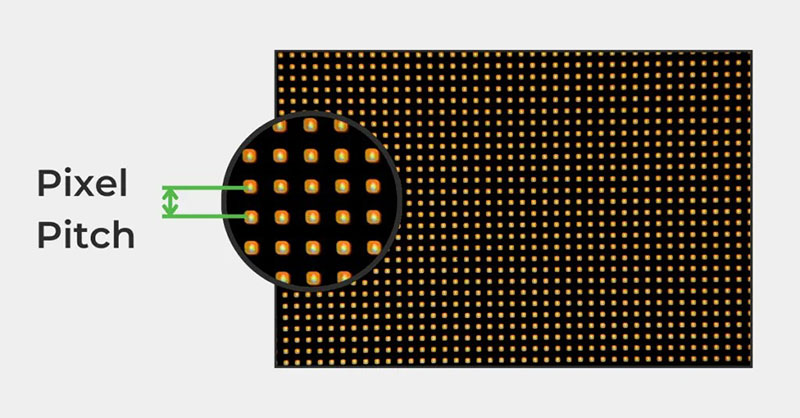
“P” simply means “pixel pitch”. The distance (in millimeters) between the centers of any two adjacent pixels. For example:
P4 = 4mm gap between pixels.
P10 = 10mm gap between pixels.
It’s that simple! But this small number has a huge impact on image quality and cost.
Pixel Pitch vs. Clarity vs. Cost
| Pixel Pitch | Pixels per Square Meter |
|---|---|
| P0.8 | 1,562,500 |
| P1.25 | 640,000 |
| P2 | 250,000 |
| P2.5 | 160,000 |
| P3 | 111,111 |
| P4 | 62,500 |
| P5 | 40,000 |
| P10 | 10,000 |
The smaller the pixel pitch, the more pixels fit into a square meter, and the sharper the image. Let’s look at the numbers to see the difference:
A P3 display has over 111,000 pixels per square meter than a P10’s 10,000. But here’s the catch: smaller pixel pitches cost more. A P2.5 display might cost 50% more per square meter than a P4.
Don’t make the mistake of thinking “smaller is always better.” If your viewing distance is 5 meters, a P5 display will look just as clear as a P3,but cost significantly less. The goal is to match the pixel pitch to your viewing distance, not to buy the smallest possible.
Pixel Pitch vs. Viewing Distance: The Golden Rule
We touched on this earlier, but let’s formalize it to avoid mistakes:
Minimum Viewing Distance (M) ≈ Pixel Pitch (mm)
Ideal Viewing Distance = 1.5x to 3x Pixel Pitch
For example:
- P2.5: Minimum 2.5m, ideal 3.75m-7.5m
- P4: Minimum 4m, ideal 6m-12m
- P6: Minimum 6m, ideal 9m-18m
- P10: Minimum 10m, ideal 15m-30m
If your closest viewer is 3m away, you an choose a P2.5-P3 display. If the closest viewer is 8m away, the P6-P8 is more cost-effective.
How Resolution Ties Into Model Choice

You might hear “resolution” thrown around with pixel pitch, and they’re closely linked, but not the same. Resolution is the total number of pixels on the screen , while pixel pitch is the gap between them.
For example:
A 4m wide x 2.25m high P2.5 display:
- Pixels per meter = 1000mm / 2.5mm = 400 pixels/m
- Total width pixels = 4m x 400 = 1600
- Total height pixels = 2.25m x 400 = 900
- Resolution = 1600×900 (1.44 million pixels)
Higher resolution means you can display more content ,like split screens or 4K videos without stretching. But resolution depends on both pixel pitch and screen size: a small P2 display might have lower total resolution than a large P4 display.
Key takeaway:
Indoor displays need higher resolution because viewers are closer, while outdoor displays can have lower resolution since viewers are farther away.
Model Recommendations by Use Case

Now that we’ve covered the basics, let’s get practical. Here’s which models work best for common scenarios:
Indoor Small-Pitch Displays (Government, Control Rooms, Studios)
These are for 1-5m close-up viewing, such as: command centers, video production studios, or high-end boardrooms.
Recommended Models: P0.8, P0.9, P1.0, P1.25, P1.53
Why?
These ultra-small pitches deliver 4K+ resolution, so text, charts, and video look crisp even from 1m away.
Size Tips: Usually 5-20㎡ (e.g., a 3x2m P1.25 display for a control room).
Key Feature: Uses die-cast aluminum cabinets for easy installation and maintenance.
Indoor HD Displays (Conference Rooms, Lecture Halls, Corridors)
These are workhorses for 3-10m mid-range viewing in offices, schools, or retail spaces.
Recommended Models: P2, P2.5, P3
Why?
It can Balance clarity and cost, The sharp is enough for presentations, but not as expensive as small-pitch models.
Size Tips: 4-30㎡ (e.g., a 4x3m P2.5 display for a company conference room).
Pro Tip:
For rooms with windows or bright lighting, you can choose a model with 1000+ nits brightness to avoid glare.
Stage & Event Rental Displays (Hotels, Concerts, Weddings)
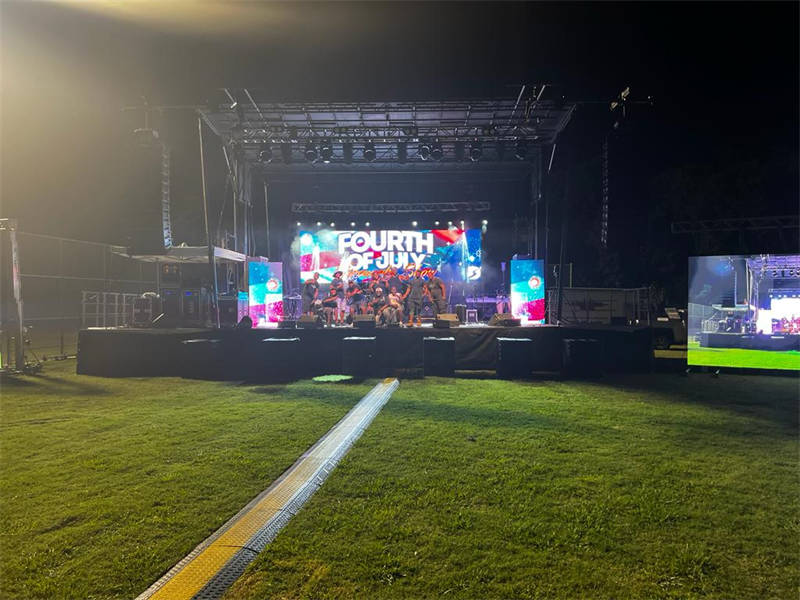
These need to be portable, easy to assemble, and durable for frequent transport. Viewing distance varies (5-20m).
Recommended Models: P3.91, P4.81 (rental), P3, P4 (fixed)
Why?
Rental models P3.91 or P4.81 have 500x500mm or 500x1000mm cainets. It comes with iron/aluminum cabinets and flight cases for transport. P3 or P4Fixed stage displays offer better clarity for permanent installations.
Size Tips: 10-80㎡ (e.g., a 6x4m P4.81 rental display for a wedding, or an 8x10m P3 fixed display for a theater).
Video Conference & Surveillance Displays (Corporate, Security)
These are for 24/7 use, with 2-5m close-up viewing and high resolution for detailed video feeds.
Recommended Models: P1.25, P1.53, P1.6, P1.8
Why?
Small pitches deliver smooth video for video calls, while durable construction handles constant use.
Size Tips: 3-15㎡ (e.g., a 2×1.5m P1.53 display for a meeting room, or a 5x3m P1.8 display for a security control room).
Exhibition Hall & Museum Displays (Brand Showcases, Art Installations)
These need to be visually striking, with viewing distances of 3-15m.
Recommended Models: P1.25, P1.53, P1.86, P2.0, P2.5
Why?
It can Balance of sharpness and size. And it is perfect for showing high-res images, videos, or interactive content.
Size Tips: 20-50㎡ (e.g., a 7x4m P2 display for a company exhibition booth).
Lobby & Reception Displays (Corporate, Hotels, Offices)
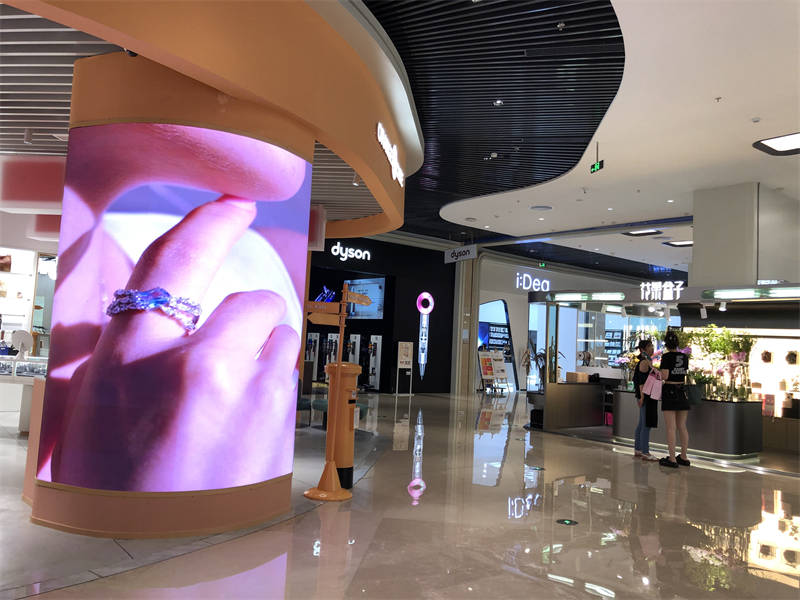
These are for brand visibility, with viewing distances of 3-10m and limited space.
Recommended Models: P2.5, P3
Why?
It is Clean, professional look without taking up too much space.
Size Tips: 8-15㎡ (e.g., a 3x2m P2.5 display behind a hotel reception desk).
Common Mistakes to Avoid
Even with the guidelines above, it’s easy to slip up. Here are the top mistakes I see clients make and how to avoid them:
Choosing a Too-Small Pixel Pitch (Wasting Money)
If your closest viewer is 8m away, a P3 display is overkill. A P6 display will look just as good and cost 30-40% less. Don’t pay for clarity you don’t need.
Choosing a Too-Large Pixel Pitch (Poor Quality)
Conversely, a P10 display in a small conference room when the viewing distance is 3m). It will look pixelated, the viewers will see individual LEDs, ruining the image.
3. Ignoring Brightness for Indoor/Outdoor Use
An indoor 600 nits P2.5 display won’t work outdoors. An 3000 nits outdoor P6 display in a dark conference room. It will be too bright, causing eye strain.
4. Forgetting Aspect Ratio
A 4:3 display will stretch 16:9 videos ,like YouTube or presentations. You should match your display’s aspect ratio to your content.
5. Overlooking Installation & Transport
Rental displays need to be lightweight and modular. Fixed displays need to fit the space’s weight capacity.
Final Checklist:
Before pulling the trigger, run through this checklist:
- I’ve confirmed indoor/outdoor use (waterproofing/brightness).
- I’ve measured the display size (length x height) and aspect ratio.
- I’ve noted the closest and farthest viewing distances.
- My chosen pixel pitch matches the minimum viewing distance.
- The resolution fits my content needs (e.g., 4K for video, text for presentations).
- The model fits my budget (no overpaying for unnecessary small pitches).
Wrapping Up:
Choosing the right LED display model isn’t about picking the “best” or most expensive option. it’s about balancing clarity, size, viewing distance, and budget. By starting with the three core questions, you should understand pixel pitch, and match the model to your use case, you’ll get a display that looks great and works for your needs.
So, have you got it down? Next time you need to choose an LED display model, just follow these steps, and you’ll be confident in your decision. If you’re still stuck, feel free to contact us. Happy choosing!