At a Glance: The Most Cost-Effective 1080P LED Poster Video Wall
- Recommended Configuration: 8 x P2 (2.0mm) LED posters in a 2-column by 4-row layout
- Total Native Resolution: 1920 x 1280 (perfect for Full HD content with minimal letterboxing)
- Physical Screen Size: 3.84 m wide x 2.56 m high (12.6 ft x 8.4 ft)
- System Budget (Hardware): 8,800–8,800–11,600 (including cabinets, processor, and mounting structure)
- Best For: Retail flagship stores, hotel lobbies, conference halls, houses of worship, and museum displays where a bright, seamless 1080P canvas is required at an optimal budget.
- Why P2 Wins: You hit exactly 1920 horizontal pixels with zero waste, use only 8 cabinets, and achieve the lowest total cost compared to all other pixel pitch options. Full cost comparison table included below.
Building a full-HD video wall from individual LED poster displays? it is a smart way to create a striking, scalable digital canvas. But if you start with a standard advertising poster panel ,you quickly face two practical questions. How many panels must you tile together to reach a true 1080P (1920 × 1080 pixels) resolution? And among the common pixel pitch options ,P1.2, P1.5, P1.8, P2, P2.5, which one gives you the best balance of performance and budget? In this post, SightLED will guide you the complete calculation and answer.
Understanding the LED Poster Display Specs
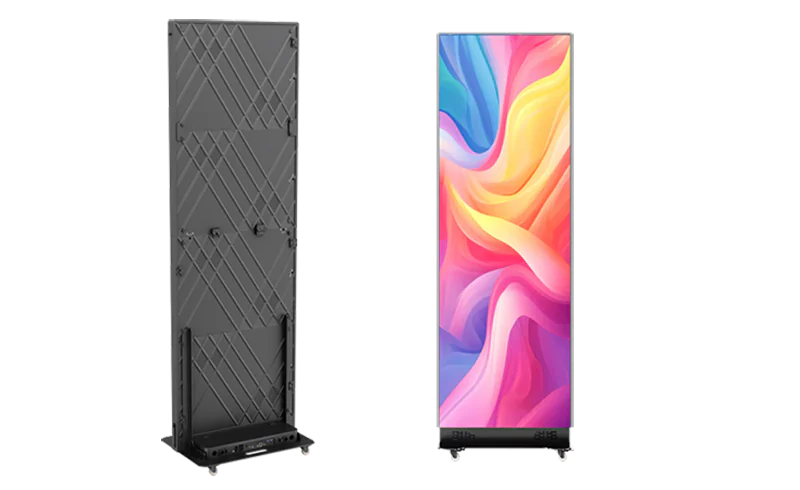
Before we start tiling, let’s lock down what one poster unit gives us. Based on the specifications provided:
| Item | Specification |
| Cabinet Size | 2073.5 × 664 × 62 mm |
| Full Display Area | 1920 × 640 mm |
| Available Pixel Pitch | P1.2 / P1.5 / P1.8 / P2 / P2.5 |
| Installation | Wall-mounted / Hanging / Embedded |
| Application | Indoor advertising display |
This means the actual LED surface is 1920 mm by 640 mm. The frame adds a little extra all around, but for resolution and tiling calculations we only care about the active area. The aspect ratio of a single poster is 1920:640, which simplifies to 3:1. That’s a very wide, narrow rectangle . It is perfect for shelf-edge advertising, menu boards or slender digital signage, but not yet a 16:9 Full HD canvas.
Now, depending on the pixel pitch, this same 1920 × 640 mm area contains a completely different number of pixels. The finer the pitch, the higher the native resolution of one poster. The five pitches we’re considering are:
- P1.2 (1.2 mm)
- P1.5 (1.5 mm)
- P1.8 (1.8 mm)
- P2 (2.0 mm)
- P2.5 (2.5 mm)
From these numbers we can immediately work out the per poster resolution.
Resolution of a Single LED Poster
The formula is simple: take the physical width or height in millimetres and divide it by the pixel pitch in millimetres.
- Horizontal pixels = 1920 ÷ pitch
- Vertical pixels = 640 ÷ pitch
Applying this to each pitch gives the following native resolutions for one cabinet:
| Pixel pitch | Horizontal pixels | Vertical pixels | Total pixels (approx.) |
| P1.2 | 1600 | 533.3 → 533 | 852,800 |
| P1.5 | 1280 | 426.7 → 426 | 545,280 |
| P1.8 | 1066.7 → 1066 | 355.6 → 355 | 378,430 |
| P2 | 960 | 320 | 307,200 |
| P2.5 | 768 | 256 | 196,608 |
Note: LED modules typically require integer pixel counts, so the fractional results for P1.2, P1.5 and P1.8 are usually rounded down to the nearest whole pixel. The exact number can vary slightly by LED display manufacturer, but the numbers above are accurate enough for tiling calculations.
It’s immediately obvious that a single poster cannot display 1080P content natively. Even the highest resolution P1.2 unit only offers 1600 × 533 pixels. It is far below the 1920 × 1080 target. So tiling multiple units is mandatory.
How Many Posters Are Needed for a 1080P Screen?

To create a display that can show Full HD content without downscaling, the total pixel matrix formed by tiling cabinets must have at least 1920 pixels across and 1080 pixels high. Because cabinets cannot be cut into fractions, we must round up to the nearest whole number of columns and rows.
Let w be the number of posters wide, and h the number of posters tall. Then:
Total horizontal resolution = w × (1920 ÷ p)
Total vertical resolution = h × (640 ÷ p)
We require:
w × (1920 ÷ p) ≥ 1920 → w ≥ p
h × (640 ÷ p) ≥ 1080 → h ≥ 1080 × p ÷ 640 = 1.6875 × p
Because w and h must be integers, we use the ceiling function:
w = ⌈p⌉
h = ⌈1.6875 × p⌉
Now plug in the pitch values:
P1.2: p = 1.2
w = ⌈1.2⌉ = 2
h = ⌈1.6875 × 1.2⌉ = ⌈2.025⌉ = 3
Posters needed: 2 × 3 = 6
P1.5: p = 1.5
w = ⌈1.5⌉ = 2
h = ⌈1.6875 × 1.5⌉ = ⌈2.53125⌉ = 3
Posters needed: 2 × 3 = 6
P1.8: p = 1.8
w = ⌈1.8⌉ = 2
h = ⌈1.6875 × 1.8⌉ = ⌈3.0375⌉ = 4
Posters needed: 2 × 4 = 8
P2: p = 2.0
w = ⌈2.0⌉ = 2
h = ⌈1.6875 × 2.0⌉ = ⌈3.375⌉ = 4
Posters needed: 2 × 4 = 8
P2.5: p = 2.5
w = ⌈2.5⌉ = 3
h = ⌈1.6875 × 2.5⌉ = ⌈4.21875⌉ = 5
Posters needed: 3 × 5 = 15
These tiling configurations give the following total pixel counts:
| Pitch | Grid (W×H) | Total cabinets | Total resolution | Physical size (mm) |
| P1.2 | 2×3 | 6 | 3200 × 1600 | 3840 × 1920 |
| P1.5 | 2×3 | 6 | 2560 × 1280 | 3840 × 1920 |
| P1.8 | 2×4 | 8 | 2132 × 1420* | 3840 × 2560 |
| P2 | 2×4 | 8 | 1920 × 1280 | 3840 × 2560 |
| P2.5 | 3×5 | 15 | 2304 × 1280 | 5760 × 3200 |
(For P1.8, using 1066 px per poster gives 2132 × 1420 total; slight variations exist depending on exact module design.)
Several interesting things jump out. P1.2 and P1.5 LED poster both require only six cabinets, but their total resolutions far exceed 1080P . You end up with 3200 × 1600 or 2560 × 1280 pixels, which is overkill for a Full HD source. P2 LED poster lands exactly on the required horizontal resolution (1920 pixels), while the vertical resolution hits 1280 (200 pixels more than 1080). P2.5 poster is the only pitch that forces you into a 3 wide arrangement, ballooning the poster count to 15. However, the physical screen is enormous (nearly 6 metres wide).
The Physical Size of the Final Screen
The width of a single active area is always 1920 mm, and the height 640 mm. Multiply by the grid:
- 2×3 grid: 3840 mm × 1920 mm (3.84 m × 1.92 m)
- 2×4 grid: 3840 mm × 2560 mm (3.84 m × 2.56 m)
- 3×5 grid: 5760 mm × 3200 mm (5.76 m × 3.2 m)
All these configurations produce a large video wall. The 2×4 layout with P2 cabinets yields a screen that is about 3.8 m wide and 2.6 m tall . It is very close to a 16:10 aspect ratio (3.84:2.56 = 1.5, while 16:10 is 1.6). With letterboxing or slight scaling you can display 16:9 content beautifully. The 2×3 grid is exactly 2:1, which needs more cropping or scaling to show Full HD. The 3×5 grid is massive and probably impractical for most indoor environments unless you have a very large venue.
From a pure resolution perspective, P2 LED poster display gives the neatest match: no wasted horizontal pixels, and a manageable number of cabinets.
Which Pixel Pitch Is the Most Cost-Effective?
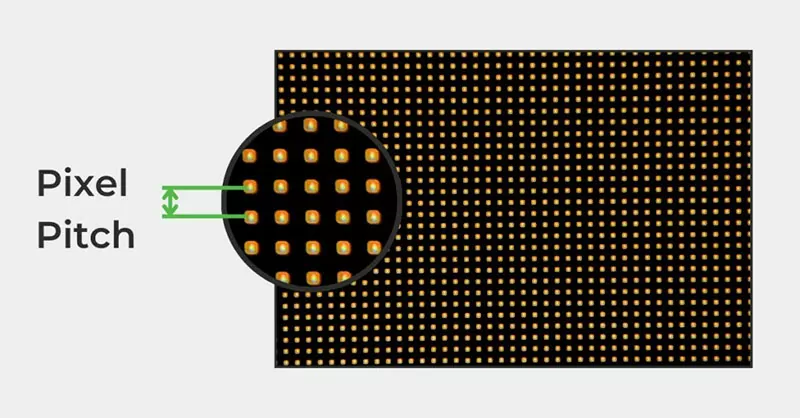
Now we get to the heart of the question. Without knowing exact manufacturer pricing, we can reason about cost-effectiveness by looking at two factors: the number of cabinets required and the relative cost per cabinet as a function of pixel pitch.
Relative cost per cabinet
LED display cost is heavily driven by pixel density. The number of pixels in one 1920 × 640 mm poster scales inversely with the square of the pixel pitch. Compare a P2 poster to a P1.2 poster:
P2: 960 × 320 = 307,200 pixels
P1.2: 1600 × 533 = 852,800 pixels
That’s roughly 2.78 times more pixels on the P1.2 cabinet. More LEDs, more driver ICs, more precise manufacturing , all of which raise the price. In the industry, the price per unit area tends to scale approximately with (p2/p1)^2, sometimes even more aggressively.
If we assign a base cost index of 1.0 to the P2 pitch, a reasonable estimate of relative per cabinet cost for the same cabinet size would be:
P2.5: (2/2.5)^2 = 0.64
P2: 1.0
P1.8: (2/1.8)^2 = 1.23
P1.5: (2/1.5)^2 = 1.78
P1.2: (2/1.2)^2 = 2.78
These are proportional figures. In reality, economies of scale and base electronics costs flatten the curve a little, but the trend is unmistakable: finer pitch means noticeably more expensive units.
Real-World Price Comparison & Total System Cost
While relative cost indices are useful, B2B buyers need actual budget numbers to make a decision. Below are realistic market price ranges (USD, EXW) for a single 1920×640 mm LED poster display at each pixel pitch, followed by the total system investment. Prices vary based on brightness, refresh rate, and brand, but these figures represent the typical range for mid-to-high-quality indoor commercial displays as of 2025.
P1.5 (1.5mm):
- Cabinets required: 6 (2×3 grid)
- Single cabinet price: 2,200–2,800
- LED screen total: 13,200–16,800
- Video processor & mounting (est.): 1,500–2,500
- Total system budget: 14,700–19,300
P1.8 (1.8mm):
- Cabinets required: 8 (2×4 grid)
- Single cabinet price: 1,500–1,900
- LED screen total: 12,000–15,200
- Video processor & mounting (est.): 1,500–2,500
- Total system budget: 13,500–17,700
P2 (2.0mm) – Recommended:
- Cabinets required: 8 (2×4 grid)
- Single cabinet price: 950–1,200
- LED screen total: 7,600–9,600
- Video processor & mounting (est.): 1,200–2,000
- Total system budget: 8,800–11,600
P2.5 (2.5mm):
- Cabinets required: 15 (3×5 grid)
- Single cabinet price: 700–900
- LED screen total: 10,500–13,500
- Video processor & mounting (est.):2,000–3,000
- Total system budget: 12,500–16,500
Notes: Video processor cost depends on input requirements; mounting structure cost varies with floor-standing or wall-mounted design. Shipping, installation labor, and taxes are not included. All prices are indicative for B2B bulk-order discussions.
The data confirms our earlier cost-index analysis: P2 delivers the lowest total system investment. While individual P2.5 cabinets are cheaper, you need 15 of them, pushing the total cost well above the 8-unit P2 system. P1.5 and P1.2 solutions demand a significant price premium for pixels you will not fully utilize with 1080P content. For a pure Full HD commercial installation, the P2 2×4 video wall is the unambiguous budget winner.
Total relative cost for a 1080P screen
We multiply the number of cabinets by the relative cost per cabinet to get a total cost index:
P2.5: 15 × 0.64 = 9.6
P2: 8 × 1.0 = 8.0
P1.8: 8 × 1.23 = 9.84
P1.5: 6 × 1.78 = 10.68
P1.2: 6 × 2.78 = 16.68
P2 emerges as the clear winner on this simple cost-index basis. Its total index of 8.0 is lower than P2.5’s 9.6, despite the P2.5 units being individually cheaper, because you need nearly twice as many of them. P1.8 poster is slightly more expensive overall. P1.5 and P1.2 poster are significantly more costly. You pay a premium for the higher pixel density that you don’t actually need for 1080P content.
Even if we adjust the cost scaling, the conclusion doesn’t change. As long as the price per cabinet at P2 is less than about 1.875 times the price of a P2.5 unit, P2 remains cheaper overall. In most market conditions, P2 comfortably meets that condition.
Resolution utilisation
Cost isn’t just about the upfront hardware price. You also need to think about how well the system uses those pixels. With P2, the total screen is exactly 1920 × 1280. A 1080P signal fits natively on the horizontal axis, and you have only 200 extra vertical pixels . It is easy to letterbox, or you can scale the image very slightly with negligible quality loss.
With P1.5 you get 2560 × 1280. That’s 640 horizontal pixels you paid for but won’t fully utilise when showing standard Full HD content. In a fixed installation where the source is always 1080P, those extra pixels are essentially wasted. P1.2 LED poster display is even more extreme: 3200 × 1600, more than double the target in both dimensions. That only makes sense if you plan to display higher than 1080P content, which the original question does not require.
P2.5 gives 2304 × 1280 . It still is a surplus of horizontal pixels, plus the screen becomes enormous and the cabinet count high. You’d need a very large space and a bigger budget for mounting, processing and power distribution.
From the viewpoint of matching the source resolution as closely as possible, P2 LED poster screen is again the best fit. It delivers a true 1920 pixel wide canvas without waste.
Practical installation and maintenance
Fewer cabinets mean fewer seams, simpler cabling, less structural support, and lower ongoing maintenance. The 2×4 grid requires eight cabinets, which is manageable. The 3×5 grid requires 15 cabinets . It is almost double the handling and potential points of failure. While the 2×3 grid uses only six cabinets, the total resolution is oversized and the physical aspect ratio doesn’t play as nicely with 16:9 video. When you factor in the cost of a video processor that can handle the larger than needed pixel canvas, the P2 setup keeps signal management simple: just feed it a 1920×1080 signal and let the screen’s internal scaling handle the vertical difference, or use a simple processor to add letterboxing.
Does Pixel Pitch Affect Viewing Distance?
Cost-effectiveness also touches on viewing experience. The ideal pixel pitch for a given viewing distance is often expressed as pitch (mm) × 1000 = minimum viewing distance in millimetres. Roughly:
P1.2: comfortable from about 1.2 m
P1.5: from 1.5 m
P1.8: from 1.8 m
P2: from 2 m
P2.5: from 2.5 m
For a large 1080P screen that will likely be viewed from several metres away in a retail store, conference hall or lobby, a P2 pitch is entirely appropriate. You would need to be within 2 metres to see individual pixels, which is closer than most people will stand to a screen that’s nearly 4 metres wide. Going to P1.5 or P1.2 increases cost without any real visible benefit at typical viewing distances. P2.5 might start to show its pixel structure at 2 m, which could be borderline for smaller indoor spaces. P2 therefore strikes the sweet spot for both cost and image quality.
How LED Poster Video Walls Compare to Other 1080P Large-Screen Solutions
If you are evaluating how to build a 1080P large display, you may also be considering LCD video walls or conventional LED cabinets. Here is how a 2×4 P2 LED poster setup stacks up against the alternatives.
P2 LED Poster Wall (2×4):
- Seams / Bezels: Zero visible seams (modular alignment)
- Brightness: 1,000–1,200 nits (high)
- Physical Size for 1080P: 3.84 m x 2.56 m
- Installation Complexity: Lightweight, front-service, poster-style mounting
- Total Cost for 1080P: 8,800–11,600
- Maintenance: Individual module replacement, thin profile
- Best For: Seamless, bright, large canvas on a moderate budget
2×2 55″ LCD Video Wall:
- Seams / Bezels: Noticeable bezel gaps (typically 1.7–3.5 mm)
- Brightness: 500–700 nits (adequate for indoors)
- Physical Size for 1080P: Approx. 2.4 m x 1.4 m (less immersive)
- Installation Complexity: Requires heavy-duty bracket matrix
- Total Cost for 1080P: 6,000–12,000 (bezel-gap compromise)
- Maintenance: Whole panel swap, thicker depth
- Best For: Small rooms where bezels are acceptable
Traditional Fine-Pitch LED Cabinets:
- Seams / Bezels: Seamless, but cabinets are often larger
- Brightness: 800–1,200 nits
- Physical Size for 1080P: Customizable, but often heavier
- Installation Complexity: Rigging frame often needed
- Total Cost for 1080P: $15,000+ (for seamless fine pitch)
- Maintenance: Module-level, but heavier access
- Best For: Ultra-high-end broadcast or control rooms
The LED poster video wall uniquely offers a seamless, bright, and truly large 1080P canvas. For most commercial interiors wanting a premium full-HD focal point, the P2 poster array is the superior choice.
So, Which Pitch and How Many Posters?
For a 1080P large screen built from 1920 mm × 640 mm LED poster displays, the most cost effective configuration is eight P2 cabinets arranged in a 2 column by 4-row grid. This gives you a native 1920 × 1280 pixel canvas that perfectly accommodates Full HD video with minimal waste, a practical physical size of 3.84 m × 2.56 m, and the lowest overall hardware investment.
Here is the final recommendation at a glance:
Pixel pitch: P2 (2.0 mm)
Posters required: 8
Layout: 2 wide, 4 high
Total resolution: 1920 × 1280 (covers 1080P with vertical letterboxing or slight scaling)
Physical screen size: 3840 mm × 2560 mm
If you anticipate future needs for resolutions higher than 1080P or an unusually close viewing distance, P1.5 with six cabinets (2×3, 2560 × 1280) could be a viable alternative. But for a pure Full HD large-screen application where budget matters, P2 is the logical choice.
Bringing It All Together
Creating a video wall from individual advertising poster displays is an exercise. You always need at least 2 cabinets wide to reach 1920 horizontal pixels with any pitch of 2.0 mm or less. The vertical requirement drives the row count. P1.2 and P1.5 LED poster meet it in 3 rows, P1.8 and P2 need 4 rows, and P2.5 needs 5 rows.
By combining the number of units with the relative price scaling of LED manufacturing, P2 clearly delivers the lowest total cost while exactly meeting the horizontal resolution target. The physical dimensions fit a wide range of commercial interiors, and the pixel density is perfectly matched to normal viewing distances for a screen of this scale.